

OAuth - Authorization Code Grant
The OAuth Authorization Code Grant allows third-party applications to access data on behalf of users in R-Service after authorization of the application by these users.
Overview
Заголовок раздела «Overview»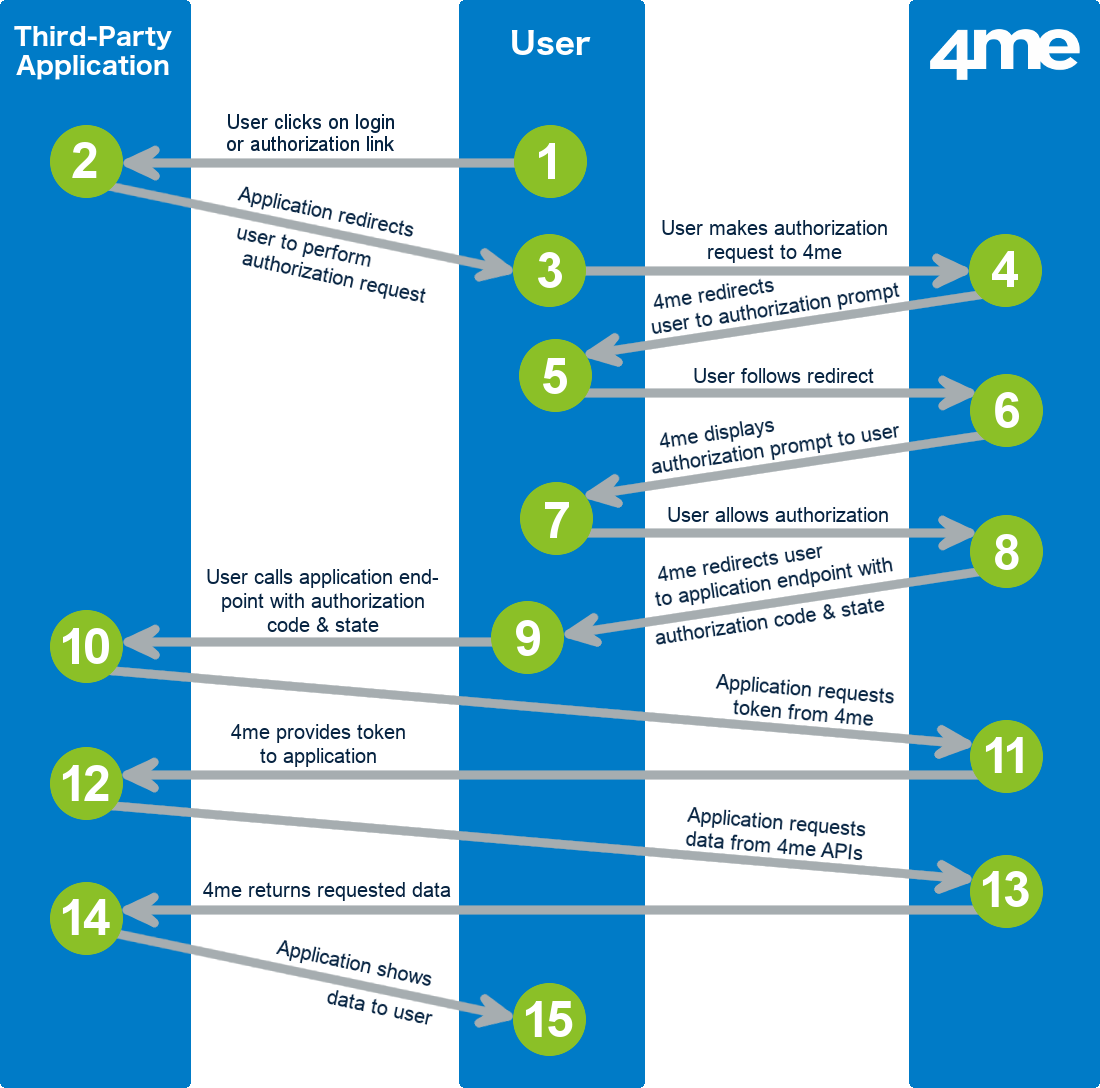
The image above illustrates the following 10 steps that complete an OAuth Authorization Code Grant flow from third-party applications:
-
A user clicks on a login or authorization link within the third-party application. The third-party application now needs to retrieve data that the user is allowed to access in R-Service.
-
The third-party application redirects the user to perform an authorization request to retrieve an authorization code. The redirect contains the following information that is required to perform the authorization request:
- the client ID of the application record in R-Service
- the redirect URI - this is the web address to which the user is sent after access is granted.
-
The user follows the redirect to perform the authorization request.
-
R-Service checks if the user has previously authorized the third-party application to access R-Service.
If authorization was already provided, the flow continues with step 8 .
If not, R-Service will redirect the user to an authorization prompt. 5. The user follows the redirect to the authorization prompt. 6. R-Service displays the authorization prompt. The authorization propmpt asks the user to either ‘Deny’ or ‘Allow’ the third-party application access to R-Service. 7. The user either allows or denies access to the third-party application.
If the user denies, the flow ends by redirecting the user back to the third-party application with an error message that the third-party application can process.
If the user allows access, this authorization is registered in R-Service. 8. R-Service generates an authorization code and redirects the user to the third-party application using the authorization response containing the code. 9. The user follows the redirect to the third-party application. 10. The third-party application performs an access token request to request an access token and a refresh token. The following data is provided by the application:
* the client ID of the application record in R\-Service,* the client secret of the application record in R\-Service,* the authorization code the application received from R\-Service in step **7** , and* the redirect URI that was provided in step **2** .- R-Service generates a temporary access token and a refresh token. The access token allows the third-party application to retrieve data from R-Service on behalf of the user. An access token is valid only for 1 hour. The refresh token allows the third-party application to retrieve a new access token and refresh token when the access token expires (see refresh token request . A refresh token is valid for 2 weeks.
R-Service returns these two tokens to the third-party application. 12. The third-party application uses the tokens to make R-Service API requests. 13. R-Service returns API responses to the third-party application. 14. The third-party application uses the data received in the API responses to render a page for the user or perform a background action.
It is important to point out that after a user has permitted a third-party application access to R-Service in step 7 , the user is able to see this in the ‘Access & Security’ section when the user opens ‘My Profile’ in R-Service.
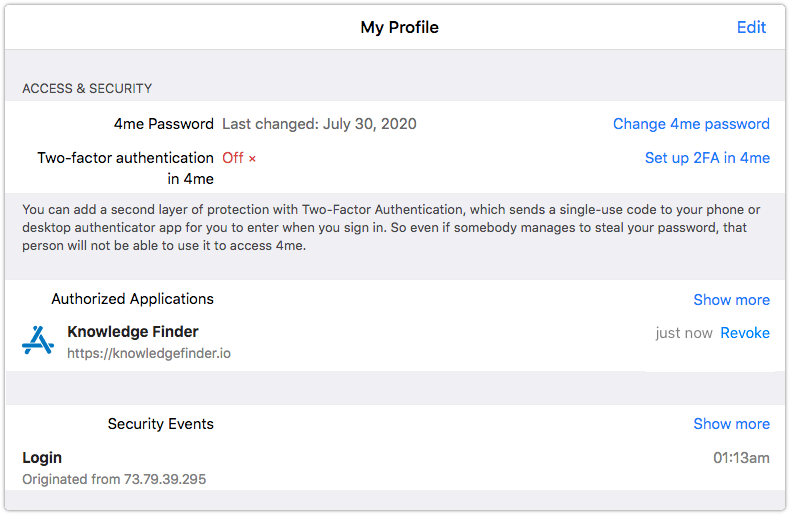
This is also where users can revoke the permissions they provided to third-party applications. When a user revokes the authorization from an application, the access tokens that the application obtained from R-Service for the user immediately stop working.
Authorization request
Заголовок раздела «Authorization request»GET https://oauth.r-service.tech/authorizeParameters
Заголовок раздела «Parameters»client_id
Required string - The client ID that belongs to the application registered in R-Service.
response_type
Required
string
- Must be set to
code
.
redirect_uri
Required string - URL in the application where users will be sent after authorization. The redirect URL must match one of the endpoints of the application registered in R-Service.
state
Optional
string
- Optional state value that
can be used by the client to prevent cross-site request forgery. The state is
included in the redirect to the
redirect_uri
after authorization by the user.
The client should verify that the state as provided in this authorization
request is the same as the state in the authorization callback.
Response
Заголовок раздела «Response»For successful authorization requests, the client will receive a redirect to the third-party application authorization page.
Status: 302 FoundLocation: https://example.r-service.tech/oauth/authorize_application?tokenFor invalid authorization requests, the client will receive a redirect to the third-party application endpoint as provided in the authorization request (in the following example https://my-app.com/oauth/callback is used).
Status: 302 FoundLocation: https://my-app.com/oauth/callbackThe endpoint will receive the following parameters:
error
Required string - Error code with one of the following values:
invalid_requestaccess_denied- when the user denied the authorization requestserver_errortemporarily_unavailable
error_description
Required string - Human-readable text providining addition information about the error.
state
Optional string - Required when “state” parameter was present in the authorization request. Contains the exact value as received from the client.
Authorization Response
Заголовок раздела «Authorization Response»After following the redirect from a successful authorization request, the authorization page is displayed where the user can either allow or deny access to the third-party application.

When the user authorizes the third-party application, a redirect response to the third-party application endpoint as provided in the authorization request will occur.
Status: 302 FoundLocation: https://my-app.com/oauth/callbackThe endpoint will receive the following parameters:
code
Required string - Authorization code generated by the R-Service application. This code expires after 10 minutes and can only be used once. If it is used more than once, all previous access tokens that were generated using that authorization code will become invalid.
state
Optional string - Required when “state” parameter was present in the authorization request. Contains the exact value as received from the client.
When the user denies access to the third-party application, a redirect response to the third-party application endpoint as provided in the authorization request will occur.
Status: 302 FoundLocation: https://my-app.com/oauth/callbackThe endpoint will receive the same parameters as described in the error response in Response .
Access Token request
Заголовок раздела «Access Token request»POST https://oauth.r-service.tech/tokenParameters
Заголовок раздела «Parameters»Please note: These parameters must be passed via the body of the POST request.
client_id
Required string - The client ID that belongs to the application record registered in R-Service.
client_secret
Required string - The client secret you received from R-Service when you registered the application in R-Service.
redirect_uri
Required string - Must match the redirect URL that was used in the Authorization request .
code
Required string - The authorization code you received in the redirect after the user authorizes the third-party application.
grant_type
Required
string
- Must be set to
authorization_code
.
Response
Заголовок раздела «Response»For successful access token requests, the client will receive a response containing the following parameters:
access_token
Required string - Temporary OAuth access token. Allows the third-party application to retrieve data from R-Service on behalf of the user.
The token becomes expires after 1 hour. The refresh token can be used to generate a new access token. The token becomes invalid when:
- when the user revokes the authorization. The user will have to re-authorize the application.
- when the scopes of the application is changed. The user will have to re-authorize the application.
- the token belonging to the
client_idandclient_secretis disabled or deleted, - when the application is disabled.
refresh_token
Required string - OAuth refresh token. Allows the third-party application to retrieve a new access token (and refresh token) when the access token expires.
The refresh token becomes expires after 2 weeks. The token becomes invalid for
the same reasons as listed with the
access_token
.
For invalid access token requests a error response as described in Response will be returned.
Refresh Token request
Заголовок раздела «Refresh Token request»POST https://oauth.r-service.tech/tokenParameters
Заголовок раздела «Parameters»Please note: These parameters must be passed via the body of the POST request.
client_id
Required string - The client ID that belongs to the application record registered in R-Service.
client_secret
Required string - The client secret you received from R-Service when you registered the application record in R-Service.
refresh_token
Required string - The refresh token you received from the Access Token request or a previous Refresh Token request.
grant_type
Required
string
- Must be set to
refresh_token
.
Response
Заголовок раздела «Response»For successful refresh token requests, the client will receive a response containing the following parameters:
access_token
Required string - Temporary OAuth access token. Allows the third-party application to retrieve data from R-Service on behalf of the user.
The token expires after 1 hour. The refresh token can be used to generate a new access token. The token becomes invalid when:
- when the user revokes the authorization. The user will have to re-authorize the application.
- when the scopes of the application is changed. The user will have to re-authorize the application.
- the token belonging to the
client_idandclient_secretis disabled or deleted, - when the application is disabled.
refresh_token
Required string - OAuth refresh token. Allows the third-party application to retrieve a new access token (and refresh token) when the access token expires.
The refresh token becomes expires after 2 weeks. The token becomes invalid for
the same reasons as listed with the
access_token
.
For invalid refresh token requests a error response as described in Response will be returned.