

R-Service Mappings
R-Service Mappings
Заголовок раздела «R-Service Mappings»Background
Заголовок раздела «Background»In R-Service SCIM user data is not directly stored in R-Service person records. The same applies to SCIM group data. Instead all incoming SCIM data is stored in separate SCIM user and group records in R-Service. Automation rules are then used to map the SCIM users to R-Service people and SCIM groups to R-Service organizations or sites.
After each update to a SCIM user, all SCIM user automation rules are executed against that SCIM user to update the person record. After each update of a SCIM group, first the SCIM group automation rules are executed, followed by the SCIM user automation rules for all members of the group that were added or deleted.
In case the SCIM user or SCIM group automation rules themselves are updated, all SCIM users/groups are reprocessed automatically.
Using automation rules to define the mapping gives the account administrator a lot of flexibility to get the SCIM integration customized correctly to their situation.
A set of default mappings is provided by R-Service to get you started quickly.
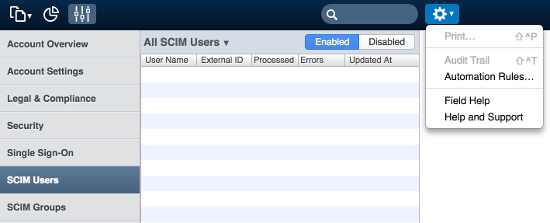
To access the automation rules, login to R-Service as an account administrator and go to the Settings console. Open the SCIM Users or SCIM Groups menu and click on Automation Rules… in the Actions menu.
Default mappings
Заголовок раздела «Default mappings»When the SCIM user or SCIM group automation rules are accessed for the first time, R-Service will populate the automation rules using the default mappings as described below. You can either use them as is, or customize the automation rules as you see fit.
To revert to the default automation rules, simply delete all SCIM user or SCIM group automation rules, close the automation rules window and open it again.
Default user mapping
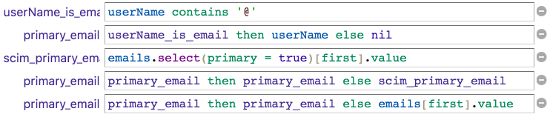
Заголовок раздела «Default user mapping»The default user mapping tries to populate as much of the R-Service person fields as possible given the SCIM user attributes available. This is how the automation rule works:
As explained in
the mapping section
the
userName
attribute should contain the primary email address of the user. If that is not the case, R-Service will look at the
emails
attribute. First it tries to find an email address marked as
primary
, if that fails it just takes the first email address defined.

Next all SCIM emails are collected. The SCIM email that holds the primary email address is excluded so as not to duplicate data in the R-Service person record.
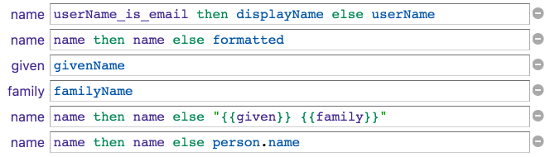
In case the
userName
attribute was not an email address, R-Service assumes it contains the name, however R-Service prefers the name to be set in the
displayName
attribute. If both attributes are empty the
name.formatted
attribute is taken. As a final fallback the name is generated by combining the
name.givenName
and
name.familyName
attributes. In case the name could not be resolved, the
person.name
is left unchanged. The name attributes can of course
be customized
.

The
title
attribute is mapped to the job title. If blank, it defaults to the current job title of the person.
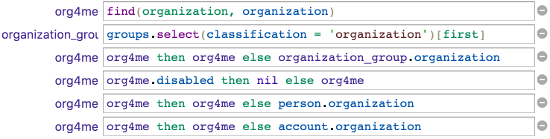
The
<enterprise extension>.organization
is used to find an organization in R-Service with that name. If missing, the first group-membership of an
organization group
is used. If the organization is disabled it is not used. If no enabled organization was found, the current organization of the person is used. If the person was new and no organization is known yet, it defaults to the organization linked to the R-Service account.
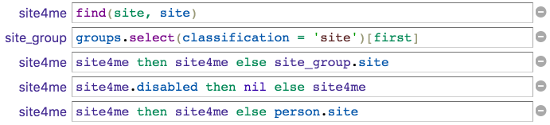
The
<enterprise extension>.site
is used to find a site in R-Service with that name. If missing, the first group-membership of a
site group
is used. If the site is disabled it is not used. If no enabled site was found, the current site of the person is used.

The
<enterprise extension>.location
attribute is mapped to the location. If blank, it defaults to the current location of the person.

The
<enterprise extension>.employeeNumber
attribute is mapped to the employeeID. If blank, it defaults to the current employeeID of the person.

The
<enterprise extension>.supportID
attribute is mapped to the supportID. If blank, it defaults to the current supportID of the person.

The
<enterprise extension>.manager.value
attribute is used to find a SCIM user record in R-Service. If found, the related person record is taken. In case the person record is disabled it is cleared. If no manager was found it defaults to the current manager of the person.

Only for new person records the
locale
attribute is mapped to the locale. As users in R-Service are able to update their locale preference, the
locale
SCIM attribute is ignored for existing people.

Only for new person records the
timezone
attribute is mapped to the time zone. As users in R-Service are able to update their time zone preference, the
timezone
SCIM attribute is ignored for existing people.

If the
userType
attribute is not blank and contains the string
VIP
the person is marked as VIP. If the
userType
attribute is blank the person’s VIP status is not altered. If the
userType
attribute is not blank and does not contain the string
VIP
the person’s VIP status will be removed.

The
person’s contacts
are marked with the
integration
flag when they were added by the SCIM integration. Before adding all
phoneNumbers
as contacts, the existing integration contacts will be cleared.

The
person’s addresses
are marked with the
integration
flag when they were added by the SCIM integration. Before adding all
addresses
as addresses, the existing integration addresses will be cleared.

People records in R-Service can only be created when at least the primary email and name are known. The condition is defined to make sure R-Service does not try to create invalid person records in vain.
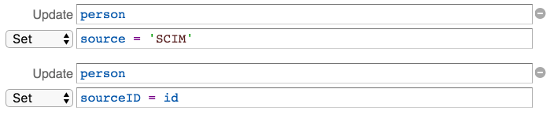
The source and sourceID are set to
SCIM
and the SCIM user record id, respectively. All other actions are simple assignments of the data gathered by the mappings described above.
Default group mappings
Заголовок раздела «Default group mappings»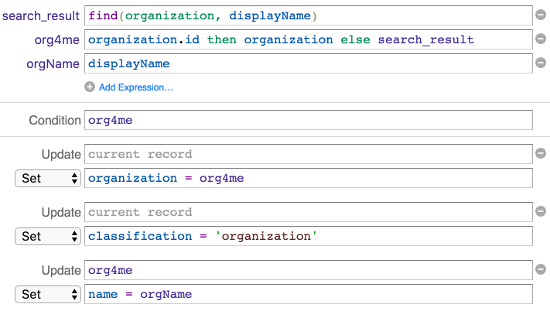
The
displayName
attribute is used to search for an organization in R-Service. When this SCIM group was already linked to a R-Service organization, that organization is kept (and possibly the name is updated). If an organization is present, the SCIM group is linked to that organization and the classification of the SCIM group is set to
organization
. Finally the name of the organization is kept in sync with the
displayName
attribute of the SCIM group.
The
members
of the group are always processed so that the SCIM group is linked to all SCIM users that are a member of this group. This is not part of the mapping.
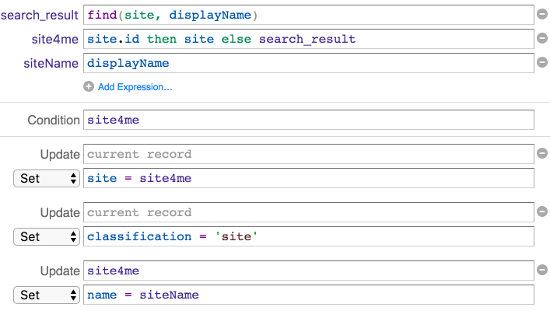
The
displayName
attribute is used to search for a site in R-Service. When this SCIM group was already linked to a R-Service site, that site is kept (and possibly the name is updated). If a site is present, the SCIM group is linked to that site and the classification of the SCIM group is set to
site
. Finally the name of the site is kept in sync with the
displayName
attribute of the SCIM group.
The
members
of the group are always processed so that the SCIM group is linked to all SCIM users that are a member of this group. This is not part of the mapping.
Custom mappings
Заголовок раздела «Custom mappings»As the SCIM mappings in R-Service are defined as automation rules, there are many possibilities to tweak your SCIM integration.
Feel free to contact your R-Service partner for assistance.
Some common customizations are shared below. Do you have some great customization that could be beneficial to other R-Service customers? If so, then please contact R-Service, and they will be added to the documentation below. Thanks in advance!
Custom user mappings
Заголовок раздела «Custom user mappings»Family name first
Заголовок раздела «Family name first»A customization could be to format the name of the person as “[name.familyName], [name.givenName]”. When you are sure that both attributes are always provided replace the default name mapping:
with

Custom group mappings
Заголовок раздела «Custom group mappings»Coming soon.